
How to Buy USDT With a Credit Card: Fees, Networks, and Failed Payments

 Prefer us on Google



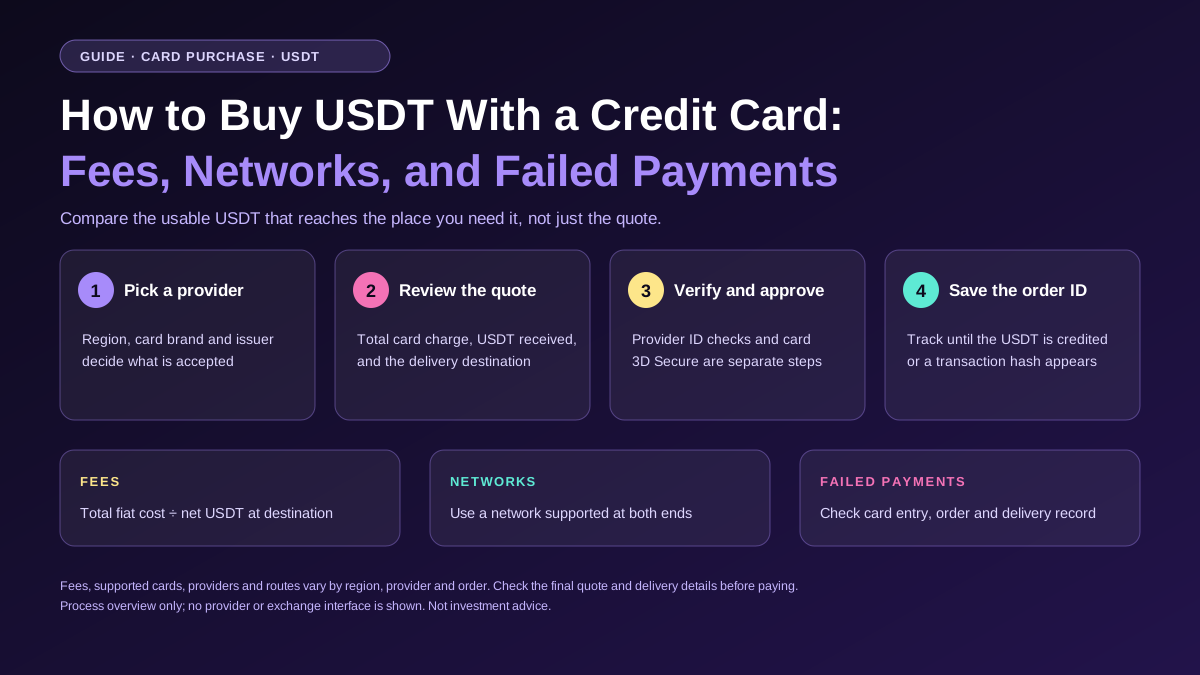
To buy Tether (USDT) with a credit card, choose an eligible payment provider, select USDT and your payment currency, then review the total card charge, the amount of USDT you’ll receive, and the delivery destination. Complete any identity and card checks shown at checkout. After payment, track the order until the USDT appears in your exchange balance or wallet. If you plan to move it to a personal wallet, include the withdrawal fee in your comparison before placing the order.
I would compare card quotes by how much usable USDT reaches the place I need it. A purchase that delivers 98 USDT to an exchange can end up costing more than one that delivers 97 USDT directly to a wallet. The result depends on the withdrawal fee and the network available for that transfer. Decide where the funds need to end up before comparing prices.
Quick Answer
- Buying with a credit or debit card: Choose USDT, enter your fiat amount, review the quote, and complete the checks shown by the provider and card issuer.
- Comparing fees: Use the total amount charged to your card and the final USDT available at your intended destination.
- Choosing a network: Match the network used to send USDT with the network supported by the receiving wallet or platform.
- Tracking a purchase: Check the provider’s order status. A pending card entry can be a temporary authorization, and an order marked sent may still be waiting for the destination to credit it.
How to Buy Tether (USDT) With a Credit or Debit Card
Start by deciding what you want to do with the USDT. If you intend to use it on the exchange where you buy it, an exchange balance may be your final destination. If you need it in a personal wallet or want to send it to another platform, choose a route that delivers to that address or lets you withdraw on a network your destination supports. Providers can offer different delivery routes, so check the order details before you authorize the card payment.
1. Choose an Eligible Provider and Payment Method
Open the platform or provider’s official website or app. Select your payment currency, enter the amount you want to spend, and choose USDT as the asset you want to receive. Look at the payment methods displayed for that order. A provider can support a card brand while still declining particular cards, currencies, or transactions. Availability can depend on your region, the provider, and the issuing bank.
If a platform presents several providers, note which one will actually process the order. The provider’s name helps you find the right verification instructions and support channel if something goes wrong. Check that your region is eligible before entering card details. If you are buying from the United States, review the provider’s state and product availability, along with its supported payment methods. WEEX’s Terms of Use list the United States as a restricted jurisdiction.
2. Review the Quote and Delivery Destination
Look for the total card charge and the estimated USDT amount on the final order screen. Confirm that the fiat currency matches the one you intended to pay with. Then check where the provider will deliver your purchase. On an exchange-credit route, confirm the account where the funds will arrive. On a wallet-delivery route, check the displayed asset, network, and receiving address against the destination’s receive screen.
If checkout refreshes the quote before you confirm it, compare the new amount with the one you originally saw. That matters when you are buying USDT for a specific payment. A quote for 100 USDT may suit an invoice for 100 USDT if delivery is direct. If your purchase goes to an exchange and you need to withdraw afterward, the wallet may receive less after the withdrawal fee. Work backward from the amount the destination needs.
3. Complete Verification and Approve the Payment
A payment provider may request identity information before processing the purchase. Your card issuer can also ask you to approve the payment through 3D Secure, for example in your banking app. These checks happen at different points in checkout. If the provider asks for a document, check its verification screen. If the banking app asks for confirmation, match the merchant details and amount with the order you initiated.
A provider may let you view a quote before it asks for identity information. If you reached this guide through a search about buying without an ID check, see our companion article on buying crypto with a credit card without verification. It explains how exchange registration, provider identity verification, and card authentication fit into the same order.
4. Save the Order ID and Confirm the Funds Arrived
Once you submit the order, keep the provider name and order ID from the receipt. Check the account balance if delivery is to an exchange. If delivery is directly to a wallet, look for a transaction hash in the provider’s order details once the transfer has been sent. You can use that hash to check the transaction on a block explorer for the selected network. Some exchange-credit purchases are recorded in the platform’s order history, while a subsequent wallet withdrawal has its own separate record.
What Fees Apply When You Buy Tether (USDT) With a Credit Card?
Start with the cost of getting the funds to their final destination. There can be a difference between the total shown by the provider and the amount that eventually appears on your card statement, particularly when currency conversion or separate issuer charges apply. There can also be a difference between the amount of USDT credited by the provider and the amount available after a separate withdrawal. The quote and the funding route tell you which costs you need to compare.
| Cost to check | Where to look | How it affects the comparison |
|---|---|---|
| Provider or processing fee | Checkout summary | Can affect the total charge or the amount delivered |
| Quoted conversion rate | Final quote | Determines how much USDT the provider delivers for your payment |
| Issuer charges or currency conversion | Card agreement or issuer support | Can increase the amount that settles on your card statement |
| Delivery or network fee | Provider’s quote, where shown | Can be included in the total or reflected in the amount delivered |
| Separate exchange withdrawal fee | Withdrawal preview | Reduces the amount reaching your external wallet if deducted from the withdrawal |
Use the final quoted amount as your starting point. If checkout already shows a fee included in the total or deducted from the USDT you’ll receive, counting it again will overstate the cost. For a separate exchange withdrawal, use the actual preview for your selected network. Fees and supported routes can vary by provider and order.
A $200 Example Comparing Two Card Quotes
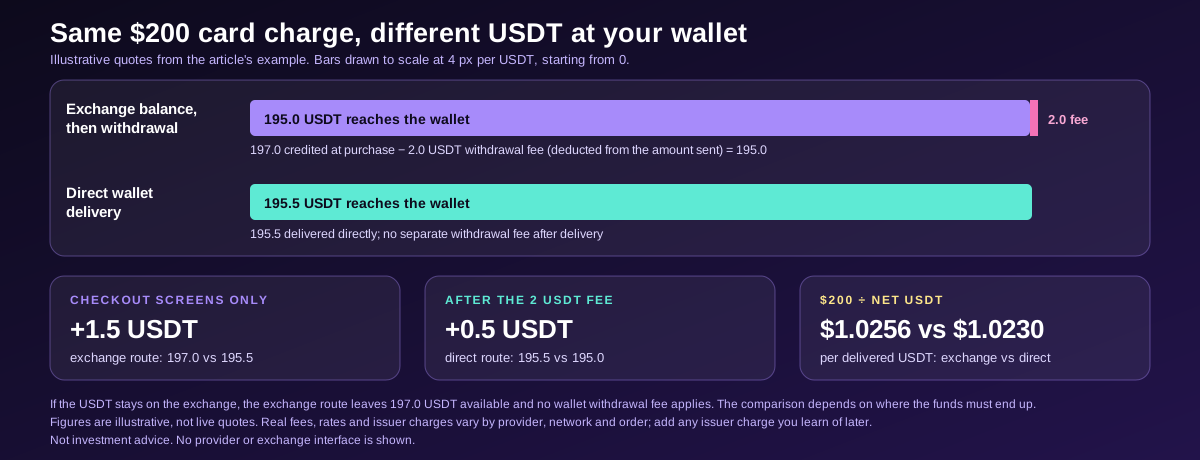
Suppose you want to buy USDT and send the full amount to a personal wallet. Two providers each show a total card charge of $200. The first credits 197 USDT to an exchange balance. The second delivers 195.5 USDT directly to your wallet. Based only on the checkout screens, the first provider appears to deliver 1.5 USDT more.
Now suppose the exchange withdrawal preview shows a fee of 2 USDT, deducted from the amount sent. The exchange route would deliver 195 USDT to your wallet. The direct route would deliver 195.5 USDT. The direct route would leave you with 0.5 USDT more for the same card charge. These figures are illustrative.
| Illustrative quote | Card charge | USDT credited at purchase | Separate withdrawal fee | USDT at final destination |
|---|---|---|---|---|
| Exchange balance, then withdrawal | $200 | 197.0 | 2.0 USDT | 195.0 |
| Direct wallet delivery | $200 | 195.5 | 0 USDT after delivery | 195.5 |
The comparison changes if the exchange balance is where you intend to use the funds. In that case, the first route leaves 197 USDT available for your intended use and you have no separate wallet withdrawal to price in. If one provider bills in another currency, compare both amounts in the currency your issuer uses to settle the transaction.
A repeatable way to compare providers is to divide the total fiat cost by the net USDT at your destination. In the example, the exchange route costs about $1.0256 per delivered USDT, while the direct route costs about $1.0230. If an issuer charge becomes known only after the purchase, add it to the total when comparing what you actually paid.
-- Price
Which Network Should You Use to Receive Tether (USDT)?
Use a network supported at both ends of the transfer. Tether publishes a list of supported protocols, but each payment provider, exchange, or wallet can support its own subset. In a direct-wallet purchase, compare the network named at checkout with the network selected on your wallet’s receive screen. If you buy into an exchange account first, check the network again when you create the withdrawal.
Suppose the receiving service gives you one USDT deposit option on Ethereum and another on Tron. If the sender offers Ethereum for that order, use the Ethereum deposit option. If the recipient gave you instructions for Tron and the sender offers only Ethereum, stop before paying and confirm which supported route you can use. Pay particular attention when addresses on different networks look similar. An address that passes a format check can still be on a network that the receiving service does not credit for that deposit.
For a separate exchange withdrawal, look up the withdrawal minimum, withdrawal fee, and destination deposit minimum before you move the funds. A small test transfer can help verify the route where the service permits it and the amount meets both minimums. Include the fee for the test if you are comparing total costs, since you may pay a separate fee when you send the remainder.
Also check what you’ll do with the funds after they arrive. If you intend to send USDT onward from a self-custody wallet, that transfer may require the network’s native asset for fees. If the destination is an exchange, check its deposit instructions and required confirmations. Two routes that deliver the same amount of USDT can leave you with different costs for the next step.
Why Was Your Card Payment Declined?
Start with the message displayed in the order history. A declined transaction can result from an incorrect card detail, insufficient available funds, a restriction on the transaction, or an incomplete 3D Secure challenge. A card can also be valid for other online purchases while its issuer restricts the specific crypto merchant or payment type. If the provider says the issuer declined the transaction, ask the issuer whether it permits that purchase before submitting the same order again.
If the error appears during verification, check whether the request comes from the provider or the issuer. A request for identification belongs in the provider’s official verification flow. An in-app bank prompt or card authentication screen belongs to the payment approval step. Completing one check can still leave the other pending, so use the status of the specific order to decide which support team to contact.
A checkout that fails after you click pay can leave a pending entry in your banking app. Before retrying, check whether the first order failed, is still processing, or completed successfully. Repeating an order while the first one is unresolved can make it harder to match card entries with order IDs. If you opened multiple orders, ask support to identify which receipt goes with which charge.
Your Card Shows a Charge but the USDT Hasn’t Arrived. What Now?
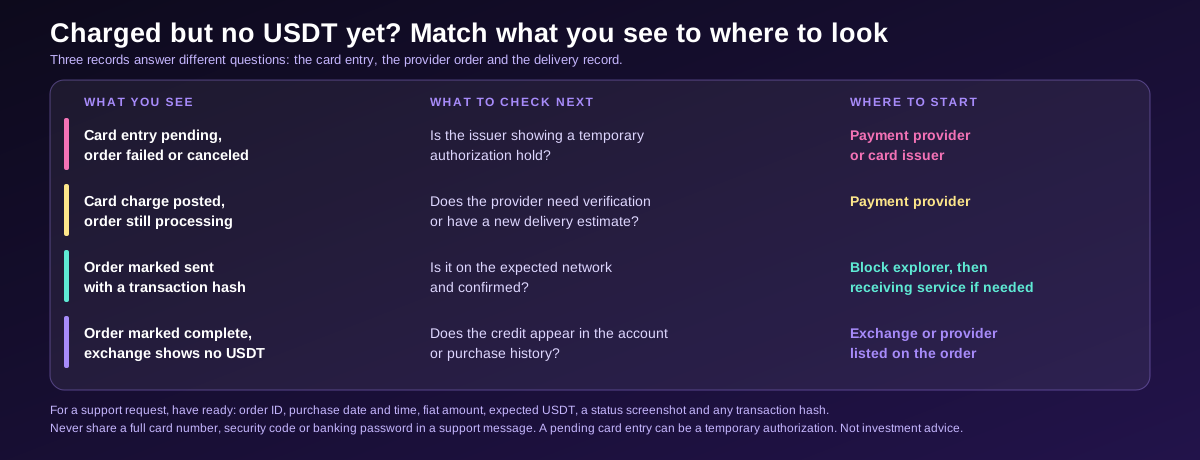
Check the card entry, the provider order, and the delivery record. A pending card entry can be a temporary authorization. The provider’s order page shows whether it needs something from you or has started delivery. A transaction hash, when one is available, lets you check an on-chain transfer separately. Each record answers a different question, so checking all three can save you from contacting the wrong team.
| What you see | What to check next | Where to start |
|---|---|---|
| Card entry pending and order failed or canceled | Whether the issuer is showing a temporary authorization hold | Payment provider or card issuer |
| Card charge posted and order still processing | Whether the provider needs verification or has an updated delivery estimate | Payment provider |
| Order marked sent with a transaction hash | Whether the transaction is on the expected network and is confirmed | Block explorer, then receiving service if needed |
| Order marked complete but exchange balance shows no USDT | Whether the credit appears in the account or purchase history | Exchange or provider listed on the order |
If the order shows a confirmed transaction but your exchange has not credited it, compare the transaction’s network, asset, destination address, amount, and confirmation status with the receiving exchange’s deposit instructions. The receiving service can investigate crediting when you give it the transaction hash and the relevant deposit details. If the order has no transaction hash and the provider still shows it as processing, the payment provider is the better starting point. If you find a network or address mismatch after sending, contact the receiving service and ask whether it offers help for that specific transfer.
For a support request, have your order ID, purchase date and time, fiat amount, expected USDT amount, and a screenshot of the status ready. Include the transaction hash if one has been issued. If support asks for card information, follow the provider’s official instructions and avoid sharing your full card number, security code, or banking password in a support message. These records also help when the provider confirms a cancellation but the bank still shows a pending authorization.
How to Check Tether (USDT) Card Purchase Options on WEEX
Where WEEX is available, open Quick Buy from the official platform and choose your fiat currency and purchase amount. Select USDT if it appears for that order, then compare the available payment options and the amount each one quotes. Check the provider name, any verification requirement, and the total before confirming. If you use the funds within WEEX, the relevant figure is the amount credited to your account. If you plan to use a personal wallet, review the withdrawal preview as a separate step. See the WEEX credit and debit card purchase guide.
If checkout offers more than one payment method, compare them using the same fiat amount and the same final destination. For example, if card and bank transfer both appear, look at the amount of USDT each delivers, the payment instructions, and the estimated processing time. A card may suit a smaller purchase you want to place quickly. A bank transfer can be worth comparing when the card quote leaves you with less USDT than you need. Follow the payment reference and instructions shown for the specific order if you select a bank transfer.
WEEX Editorial View
Plan the delivery route before choosing the quote. If the USDT is for an exchange balance, compare what you’ll have available in that account. If it’s for an external wallet, include the network you can actually use and what the wallet receives after all applicable charges. That prevents the most avoidable mistake in a card purchase: accepting an attractive quote and then discovering the remaining transfer leaves you short or requires a different network.
FAQ
1. Can You Buy USDT With a Debit Card Instead of a Credit Card?
Yes, where the selected provider accepts your debit card and supports USDT for your region and order. Check the debit card quote separately because the provider, issuer requirements, and available amount can differ.
2. Is It Cheaper to Buy USDT With a Credit Card or a Bank Transfer?
Compare the total fiat paid with the net USDT at the same destination. A lower advertised fee can still come with a less favorable rate. If one route requires an exchange withdrawal, include that fee when comparing the two.
3. Do You Need to Pick a Network When Buying USDT on an Exchange?
Check the delivery type. If the purchase credits your exchange account, you normally choose the network when you later withdraw. If the provider delivers directly to an external wallet, confirm the network before paying.
4. Why Does My Bank Show a Pending Charge After a Failed Purchase?
The entry can be a card authorization hold. Check the provider’s order status first. If the order failed or was canceled, ask the provider whether the authorization was released and check with your issuer if the entry remains.
5. How Long Does It Take to Receive USDT After Paying by Card?
Timing depends on verification, issuer approval, provider processing, and delivery. A direct wallet transfer may also need network confirmations. Use the order status for the estimate and check the transaction hash if the provider has sent the funds on-chain.
Author
WEEX SEO Team
Updated
November 19, 2026
Data Cutoff
Provider documentation reviewed through November 19, 2026. The $200 quote comparison is illustrative.
Sources
- WEEX card purchase guide and Terms of Use, covering Quick Buy, settlement, withdrawals, and regional restrictions.
- Tether, official list of supported protocols.
- EMVCo, official overview of 3-D Secure card authentication.
- MoonPay and Mercuryo, provider documentation on buying crypto, card authorizations, and payment errors.
This content is provided for general informational purposes only and doesn't constitute financial, investment, legal, or tax advice. Any events, rewards, online promotions, or related information mentioned herein should not be considered a recommendation, solicitation, or invitation to purchase, sell, trade, or otherwise deal in any crypto assets. Crypto assets are highly volatile and may result in loss. The availability of WEEX services, products, and related events may vary by region. You are responsible for ensuring that your participation is in accordance with applicable local laws and regulations.
You may also like

2 Financial Stocks to Buy Near Their 52-Week Lows

Airbnb’s New $12 Billion Buyback Is Backed by a 35% Free Cash Flow Margin. Here’s What It Means for Shareholders.
Not Anthropic. Not SpaceX. This Is the AI Stock to Buy for the Long Term

Opinion: The $6 trillion evaporation of the US stock market in 45 days is not the burst of the AI bubble; a bottom-fishing rebound in April 2025 may reoccur

CITIC Construction Investment Releases Food and Beverage Investment Strategy for 2027

VIX Soars to Highest Level Since Last Year’s Tariff Turmoil, Goldman Sachs Fear Index Nears Maximum, US Stocks May Face Over $80 Billion Sell-off Next Week

Prediction: Rocket Lab Will Triple Its Revenue by 2028. Here's What That Would Mean for the Stock.
Oracle Completes Funding for Collaboration with OpenAI

Forget SpaceX: This Stock Could Be the Real Winner of the Space Race

Where Will Bloom Energy Stock Be in 5 Years After More Than Doubling Its Revenue in 2026?

Ripple Is Rapidly Expanding the Potential Use Cases for Its Stablecoin. Here's Why That's Bearish for XRP.
Kimberly-Clark Completes Kenvue Acquisition, Expects 2.1 Billion USD in Savings

Lagarde: EU funds should bear initial losses for chip factories and data center projects
Robotaxis: 4 Stocks Positioned to Win

Would Warren Buffett Buy Anthropic? This Is the One Question He'd Have

Société Générale Predicts S&P 500 Will Rise to 8500 Points by End of 2027
Will the Market Rebound After Thanksgiving? Bank of America: Likely Short-Term, Major Trends Require Three Conditions

XRPL Credit Updates Approaching 29 Vote Threshold
NVIDIA Stock Price Falls 40% from Highs, Still Hope Remains

Why Bending Spoons May Choose to Issue Convertible Bonds Next
Barclays Strategist Says Stock Sell-off Driven by AI Concerns Has Overshot
Lagarde Calls for Advancing Capital Markets Union, Warns of Intensifying Savings Outflow

World Bank Considers Utilizing USDC Payments, Collaborates with Citi and Circle to Enhance Development Fund Transfer Efficiency

What is Suppressing Gold and Bitcoin?

UBS Raises Palo Alto Networks Price Target to $400, Maintains Neutral Rating

TD Cowen Lists Navan as Top Software Stock for 2027, Target Price Raised to $32
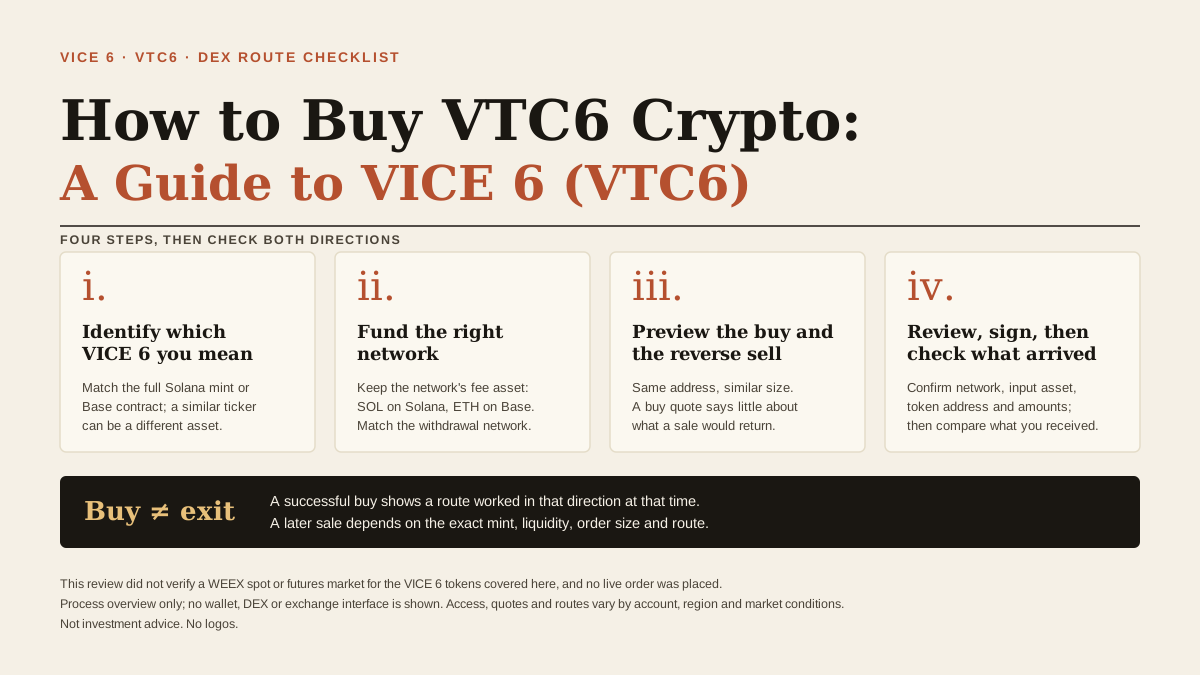
How to Buy VTC6 Crypto: A Guide to VICE 6 (VTC6)
Learn how to buy VTC6 crypto through a supported DEX route, verify the exact VICE 6 token address, and review buy and sell quotes before you swap.

UBS Downgrades Deutsche Börse Rating to 'Sell', Citing Overvaluation After 49% Surge This Year
Where is Nvidia Investing Its Money?

ZRO Unlock on November 20: Why Are Supply Estimates Different?
2 Financial Stocks to Buy Near Their 52-Week Lows
Airbnb’s New $12 Billion Buyback Is Backed by a 35% Free Cash Flow Margin. Here’s What It Means for Shareholders.
Not Anthropic. Not SpaceX. This Is the AI Stock to Buy for the Long Term
Opinion: The $6 trillion evaporation of the US stock market in 45 days is not the burst of the AI bubble; a bottom-fishing rebound in April 2025 may reoccur
CITIC Construction Investment Releases Food and Beverage Investment Strategy for 2027
VIX Soars to Highest Level Since Last Year’s Tariff Turmoil, Goldman Sachs Fear Index Nears Maximum, US Stocks May Face Over $80 Billion Sell-off Next Week
Latest articles


Latest coin listings on WEEX


