
Buy Limit Order: How to Buy Crypto Below the Market Price

 Prefer us on Google
A buy limit order is an instruction to buy an asset at a price you set or lower. It is how traders buy dips without staring at the screen: you place the order below the current price, it waits in the order book, and it fills only if sellers come down to your level.
The guarantee runs one way. You will never pay more than your limit, but there is no guarantee the market will ever drop far enough to fill you. Getting the price right, and deciding what to do if the order never fills, is most of the skill.
This guide walks through a buy limit order with SOL at $107.41, the SOL/USDT spot price on WEEX on October 14, 2026, then covers laddered entries, the instant-fill trap, and how to tell a buy limit from a buy stop.
How a Buy Limit Order Works
When you submit a buy limit, the exchange compares your price with the best ask, the lowest price any seller currently accepts.
- Your price is below the best ask: the order joins the bid side of the order book and waits. It fills when sellers are willing to sell at your price or lower.
- Your price is at or above the best ask: the order fills immediately, at the best available asks. You pay the market price, not your higher limit.
So a buy limit at $115 when SOL trades at $107.41 does not cost you $115. It buys right away at roughly $107.41, because sellers are already offering below your cap.
Buy Limit Order Example With SOL
On October 14, 2026, SOL traded at $107.41, with a 24-hour range of $105.63 to $109.
One entry. You want 10 SOL but would rather not chase. You place a buy limit for 10 SOL at $104. If SOL dips to $104, you buy for about $1,040 before fees. If SOL holds above $105 and rallies, the order never fills and your USDT stays untouched.
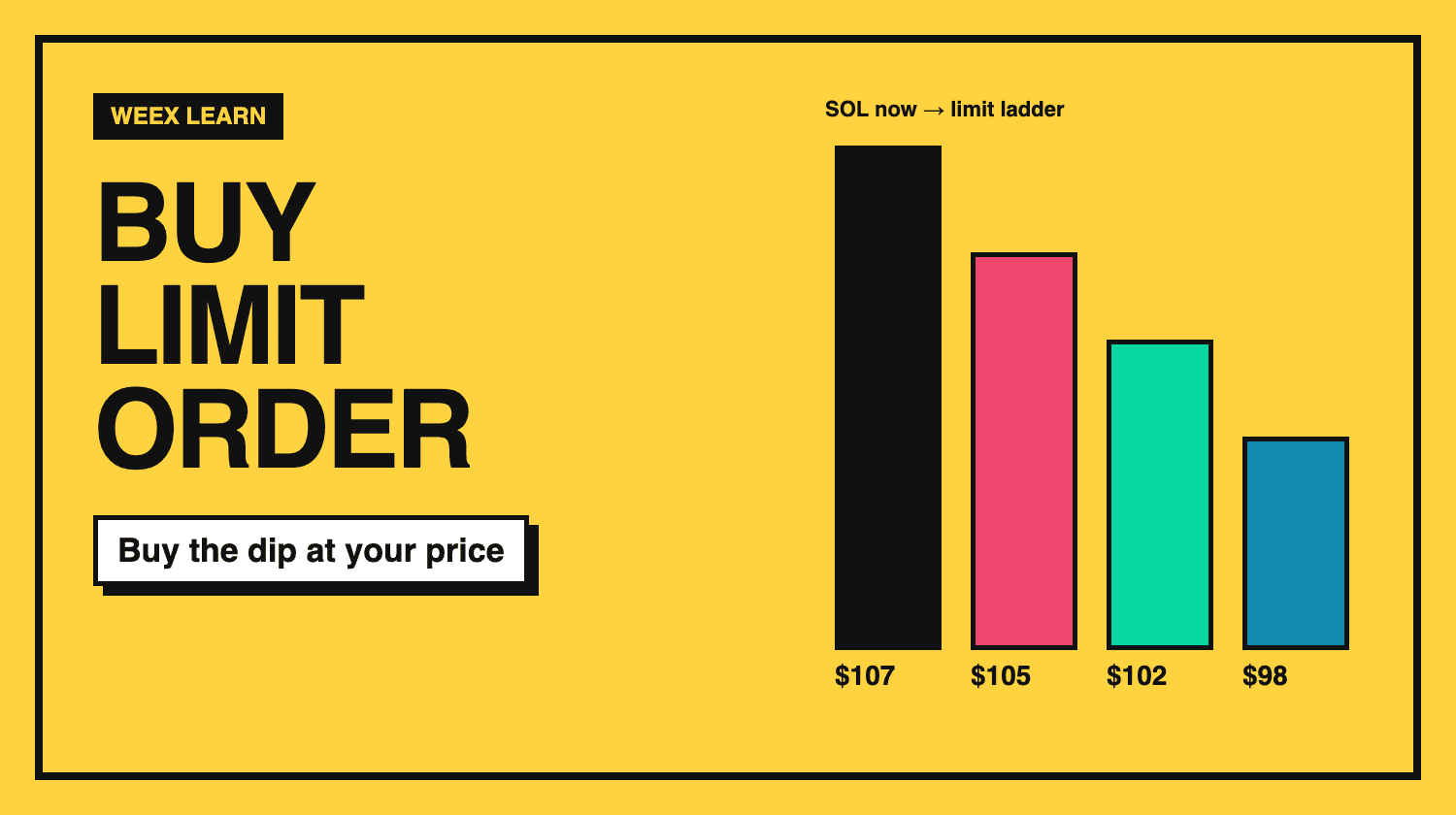
A laddered entry. Instead of betting on one level, you spread the order:
- 3 SOL at $105
- 3 SOL at $102
- 4 SOL at $98
If SOL falls to $102 and rebounds, you own 6 SOL at an average of $103.50 and still have USDT set aside for a deeper drop. If SOL falls all the way to $98, you own 10 SOL at an average of about $101.30. A ladder lowers the chance of buying everything at the first dip and missing a better price later, and it lowers the chance of buying nothing at all.
Buy Limit vs Buy Stop vs Market Buy
- Buy limit: placed below the current price. It buys on the way down, for traders who want a discount.
- Buy stop (or buy stop limit): placed above the current price and activated only when price rises to the trigger. It buys on the way up, for traders who want confirmation of a breakout. Our stop limit order guide explains how that order behaves.
- Market buy: fills immediately at the best available asks, with no price protection.
The choice reflects your view. A buy limit says the price will come back to you. A buy stop says you only want in if the move proves itself.
-- Price
What Traders Usually Get Wrong With Buy Limits
Buying a falling knife. A buy limit fills precisely when the price is dropping. If the drop is driven by bad news, such as a hack, a delisting or a large token unlock, your order can fill on the way to a much lower price. Before placing a dip order, ask why the price might reach your level.
Setting the price too close to the market. An order $0.20 below the price on a token that moves $3 a day will fill on ordinary noise, which may be fine, but it is not really buying a dip.
Setting the price too far away. An order 30% below the market may sit for months while you miss the trade entirely. Many traders anchor dip orders to recent lows or obvious support rather than an arbitrary discount.
Tying up funds and forgetting the order. On most exchanges the USDT for an open buy limit is reserved until the order fills or you cancel it. Review open orders so cash is not locked in plans you have abandoned.
How to Place a Buy Limit Order on WEEX
- Open the SOL/USDT spot market.
- In the order panel, choose Buy and select the Limit tab.
- Enter your limit price in USDT, below the current price for a dip entry.
- Enter the amount of SOL, or set it with the slider, and check the total.
- Confirm, then manage the order under your open orders.
To build a ladder, place several orders at different prices. For the full range of order types on the platform, see Understanding Order Types on WEEX Exchange.
A buy limit order lets you decide your entry price in advance and wait for the market to meet it. Place it below the current price, consider a ladder rather than a single level, and think about why the price might fall to your order before you leave it open.
FAQ
1. What is a buy limit order?
It is an order to buy an asset at a set price or lower. It waits in the order book until sellers come down to your price.
2. What happens if I set a buy limit above the current price?
It fills immediately at the best available asks, so you pay about the current market price, not your higher limit.
3. What is the difference between a buy limit and a buy stop?
A buy limit sits below the market and buys a dip. A buy stop sits above the market and buys only after the price rises to the trigger.
4. Does a buy limit order lock my funds?
On most exchanges, yes. The USDT needed for the order is reserved until it fills or you cancel it.
This content is provided for general informational purposes only and doesn't constitute financial, investment, legal, or tax advice. Any events, rewards, online promotions, or related information mentioned herein should not be considered a recommendation, solicitation, or invitation to purchase, sell, trade, or otherwise deal in any crypto assets. Crypto assets are highly volatile and may result in loss. The availability of WEEX services, products, and related events may vary by region. You are responsible for ensuring that your participation is in accordance with applicable local laws and regulations.
You may also like
Cyberleek: How the GTA 6 Leaker's Memecoin Turns Leaks Into Fees

How to Buy New Crypto Before Listing: 5 Routes and Their Traps
What Is Staking? 4 Myths to Clear Up Before You Stake Crypto
What Is Blockchain and How Does It Work? One Real Block Explained
XST Coin Explained: Two Tokens Share One Ticker, Check Which One
2Z Token Unlock on October 2: What 1.66B DoubleZero Tokens Mean

Solana Alpenglow Mainnet Date: Why Sept 28 Wasn't Launch Day

Phantom Wallet vs MetaMask: What's the Difference
How to Install and Set Up Phantom Wallet

What Is Phantom Wallet? A Complete Guide to the Solana Wallet
How to Buy USDT with EUR via SEPA Bank Transfer on WEEX
How to Buy Bitcoin with EUR in Europe on WEEX
How to Buy Crypto in Europe with EUR on WEEX OTC
How to Buy Crypto in Vietnam with VND on WEEX OTC
How to Buy USDT in Vietnam with VND via MoMo or Bank Account
How to Buy Bitcoin in Brazil with BRL on WEEX OTC
How to Buy Crypto in Australia with AUD on WEEX
How to Buy Bitcoin in Australia with Apple Pay, Google Pay or Card
How to Buy USDT in Japan with Apple Pay, Google Pay or Card

Pump.fun (PUMP) Price Prediction: Attributed Scenarios, Tokenomics and Risks
Hunter Biden's Laptop Token Is Now Live on Base: Watch Out for Copycat Tokens
XST Stock: Why This Ticker Points to Four Completely Different Companies
CyberLeek Crypto: The GTA 6 Token's Exit Liquidity Problem
XST ETF vs XST Coin (XSolut): Don't Confuse These Two Completely Different Assets
Anthropic Tokenized Stock: What ANTHROPIC Actually Gives You
Can PONS Reach $1? PONS Coin Price Analysis After WEEX
Can PONS Reach $1? PONS Coin Price Analysis After WEEX
XST Coin Price Bounced 19% Off a New Low in Hours: Is This the Bottom or Just Noise?

WEEX Welcome Bonus Explained: How New User Rewards Work
Which Crypto Exchange Offers the Widest Range of Assets for Pakistani Traders?
Cyberleek: How the GTA 6 Leaker's Memecoin Turns Leaks Into Fees
How to Buy New Crypto Before Listing: 5 Routes and Their Traps
What Is Staking? 4 Myths to Clear Up Before You Stake Crypto
What Is Blockchain and How Does It Work? One Real Block Explained
XST Coin Explained: Two Tokens Share One Ticker, Check Which One
2Z Token Unlock on October 2: What 1.66B DoubleZero Tokens Mean
Contents
Popular coins
Latest articles


