
How to Buy ATX Crypto: How to Verify Project ATX (ATX) Before Swapping

 Prefer us on Google


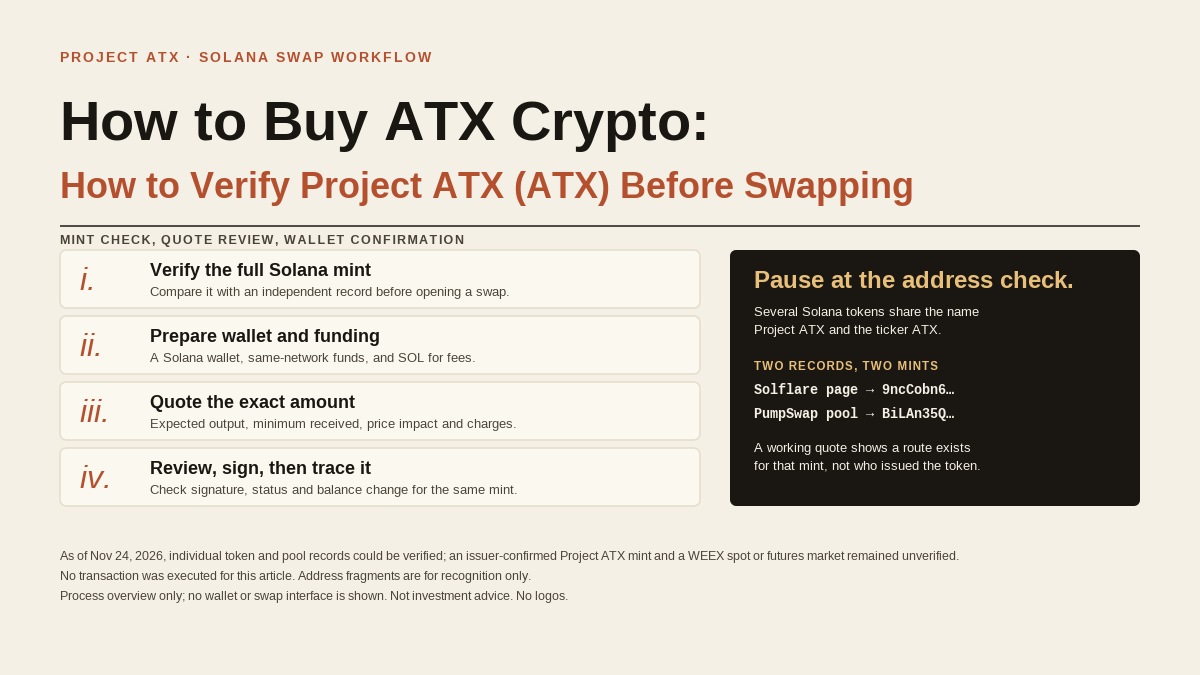
To buy a specific Project ATX (ATX) token on Solana, first verify its full mint address. Then select that mint in a Solana-compatible wallet or swap interface, request a quote for your intended amount, and review the receiving token and minimum output before signing. Several Solana tokens share the Project ATX name and ATX ticker. As of November 24, 2026, we could verify individual token and pool records. An issuer-confirmed Project ATX mint and a corresponding WEEX spot or futures market remained unverified.
The most important decision happens before you connect a wallet. A buying page can correctly show how to swap one ATX token and still take you to a different mint from the one you intended. We found a Solflare buying page that points to one mint and a documented PumpSwap market that contains another. If all you have is the ticker, a logo, or a screenshot of the price, pause at the address check. A working quote can confirm that a route is available for the selected mint. Establishing who issued that mint takes separate evidence.
Author: WEEX SEO Team
Published: November 24, 2026
Updated: November 24, 2026
Data Cutoff: November 24, 2026, 16:15 UTC+8 (08:15 UTC)
Quick Answer
- Verify the full Solana mint before choosing an ATX result. Different mints can share the Project ATX name.
- Use the mint to identify the receiving token and your wallet’s receive address to fund the wallet. These addresses serve different purposes.
- Review the expected output, minimum received, price impact, and charges for your exact trade size.
- After signing, check the transaction signature, execution status, and balance change for the same mint.
Where Can You Buy Project ATX (ATX)?
We could verify public Solana records for multiple Project ATX mints and a historical ATX/USDC market on PumpSwap for one of them. That pool record identifies the assets it contained and shows that the market existed at the recorded time. To establish whether you can swap the same token now, you need a fresh quote for its full mint and your intended amount. We did not execute a transaction for this article.
| What you find | What the reviewed source identifies | What to verify before proceeding |
|---|---|---|
| An ATX/USDC PumpSwap pool | DexPaprika identifies pool 3Y7K…ZCwE as an ATX/USDC market for the BiLAn35Q…pump Solana mint. | Confirm the full mint and request a fresh quote. The historical pool record does not show the output available for your trade now. |
| A wallet page titled “How to buy PROJECT ATX” | The Solflare page reviewed identifies a Solana mint beginning 9ncCobn6. | Compare the full address to the token you intended. This page points to a different mint from the PumpSwap example above. |
| Another Project ATX tracker result | Solana Tracker identifies a separate mint beginning 2PZrBUNk. | Keep this record separate unless this is the exact mint you meant to research. |
| An AstroX (ATX) buying guide | AstroX is documented as a token on BNB Smart Chain. WEEX has an informational page for that asset. | Read the name and network together. An AstroX page does not establish a market for a Project ATX Solana mint. |
The useful distinction is between finding a page, identifying the asset on that page, and confirming that a route can handle your amount. You can do the first two with public records. The third depends on the current quote, the chosen input asset, and available liquidity. A button labeled “Buy ATX” leaves those details to the next screen.
Step 1. Verify the Project ATX (ATX) Mint Before Opening a Swap
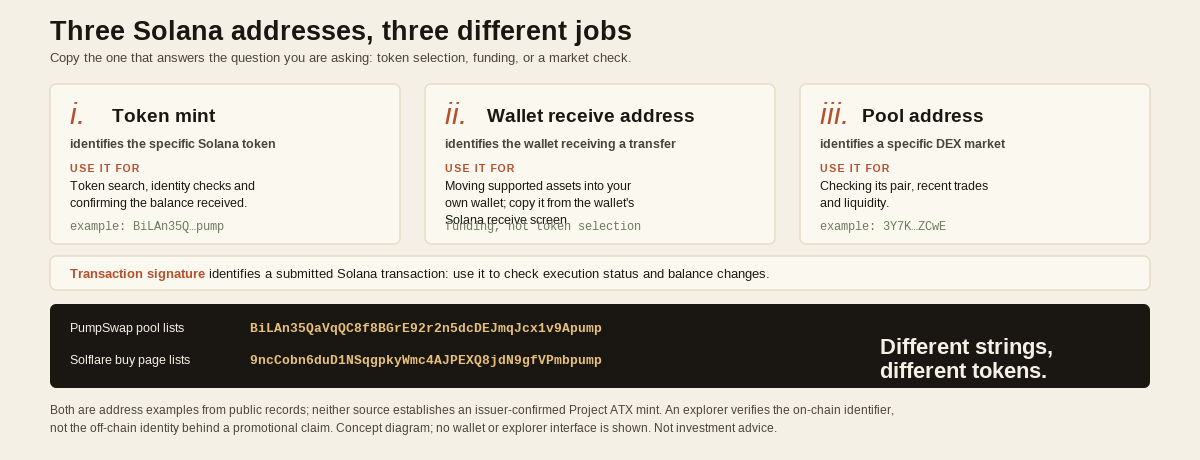
On Solana, the mint address identifies the token. The wallet address identifies where you receive assets. A liquidity pool address identifies a market. When a tracker shows all three kinds of address across different screens, copy the one that answers the question you’re asking. For token selection, you want the full mint. For a withdrawal to your own wallet, you want the wallet’s receive address.
| Address type | What it identifies | Where you use it |
|---|---|---|
| Token mint | The specific Solana token | Token search, identity checks, and confirming the balance received |
| Wallet receive address | The wallet receiving a transfer | Moving supported assets to your own wallet |
| Pool address | A specific DEX market | Checking its pair, recent trades, and liquidity |
| Transaction signature | A submitted Solana transaction | Checking execution status and balance changes |
Open the original token or market page and find the full mint. Check it against an independent record, such as a Solana explorer or another data provider. If someone says the token belongs to a particular project, look for an issuer-controlled source that explicitly names the same network and full mint. An explorer can verify the on-chain identifier and show its activity. It cannot by itself establish the off-chain identity behind a promotional claim.
Here is what the identity check looks like in practice. The documented PumpSwap pool lists the full mint BiLAn35QaVqQC8f8BGrE92r2n5dcDEJmqJcx1v9Apump. The Solflare buy-and-swap page we reviewed identifies 9ncCobn6duD1NSqgpkyWmc4AJPEXQ8jdN9gfVPmbpump. Comparing the full strings resolves the ambiguity before a quote is involved. Both are address examples drawn from public records. Neither source establishes an issuer-confirmed Project ATX mint.
-- Price
Step 2. Prepare a Solana Wallet and Check the Funding Network
For a same-network swap, hold your input asset in a Solana-compatible wallet on Solana. A balance on an exchange or on another blockchain may require a separate withdrawal or transfer first. If you are funding a self-custody wallet, open its Solana receive screen, verify that the sending platform supports the same asset and network, and compare the destination address shown in both places. Exchange withdrawal minimums and charges should be taken from the final withdrawal preview, since they depend on the asset and network selected.
Solana charges transaction fees in SOL. Keep enough available for the swap and any other transaction you expect to make. If your wallet has never held the output mint, the transaction may also create a token account that needs a SOL balance to meet its rent-exemption requirement. That amount is distinct from the swap’s exchange rate and network fee. Some wallet flows can deduct the fee from an eligible token balance, subject to their own conditions. Read the fee preview for the specific route before relying on that option.
Choosing SOL or USDC as the input sets the asset you spend. The route can go through other pools or assets before reaching the final mint, so a USDC-funded quote does not necessarily use a single ATX/USDC pool. If the interface proposes a cross-chain route and you intended a Solana-only swap, check whether you selected the wrong network for the input or output. A same-network swap and a cross-chain transfer can have different costs and confirmation behavior.
Step 3. Request a Quote for the Exact Amount You Want to Spend
Open the swap interface from the wallet or service you intended to use. Choose the input asset, search for the receiving token by its verified full mint, and enter the amount you would spend. Then confirm the receiving token and network again. Phantom’s documentation explains how to inspect a token’s address and preview a swap. Jupiter’s routing documentation identifies the input mint, output mint, expected output, and minimum acceptable output as distinct fields.
The quote needs to answer more than “How many ATX will I get?” It should let you check what leaves your wallet, what arrives, and what can change before execution. Different interfaces display the details in different places, so expand the pricing or route view when the first screen shows only a headline value.
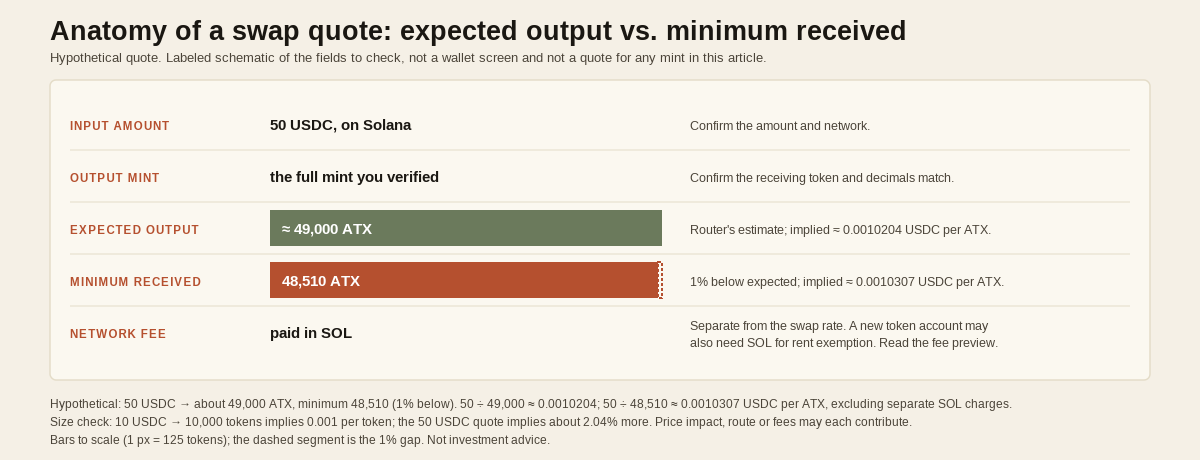
| Quote field | What it means | What to check |
|---|---|---|
| Input amount | How much of the selected asset you plan to spend | Confirm the amount and network. |
| Expected output | The router’s current estimate of how many tokens arrive | Confirm the output mint and decimal places. |
| Minimum received | The lowest acceptable output under the quoted terms for an exact-input swap | Compare it with the expected output and check the tolerance. |
| Price impact | The estimated effect of your order size on execution relative to the market reference | Check whether the quoted rate worsens materially as size increases. |
| Route and charges | The path used to execute the swap and the costs disclosed in the preview | Identify charges already included in the quote and charges deducted separately. |
For a hypothetical example, imagine a quote shows that spending 50 USDC would return an estimated 49,000 ATX, with a minimum of 48,510 ATX. The minimum is 1% below the expected output. The implied price at the expected output is about 0.0010204 USDC per ATX, excluding any separate SOL charges. At the minimum output, the same 50 USDC implies about 0.0010307 USDC per ATX. Those figures show what the preview permits under the stated assumptions. They are sample numbers, not a current quote for any of the mints in this article.
A useful size check is to compare the implied prices of two fresh quotes on the same side. In the same hypothetical market, a 10 USDC quote for 10,000 tokens implies 0.001 USDC per token. The 50 USDC quote above implies about 2.04% more per token. Part of that difference may come from price impact, and the route or fees may also change between quotes. Compare output per unit of input so you can see whether the larger amount is receiving proportionally fewer tokens.
If exit liquidity matters to you, request a reverse quote for a relevant token amount without signing it. That preview can reveal whether the selected interface currently offers a way back to your desired asset and how much the route estimates you would receive. A reverse quote is a snapshot. It can change with pool balances, market activity, or the size you enter.
Step 4. Review the Wallet Preview and Confirm the Transaction on Solana
The wallet’s approval screen is the last place to compare the quote with the transaction you’re about to authorize. Confirm the input asset and amount, the receiving asset and mint where shown, and any separate SOL charge or account creation. If the preview shows an unexpected outgoing asset, an unfamiliar action, or a destination you cannot explain, cancel and check the route again. A swap interface does not need your recovery phrase or private key.
After signing, save the transaction signature and open it in a Solana explorer. Check the execution status, the outgoing amount, and the token balance change for the receiving mint. A submitted transaction can still be pending or fail. If your balance hasn’t updated yet, look up the original signature before starting another swap. That check can tell you whether the first transaction executed and help you avoid submitting a second order while the first is unresolved.
A confirmed receipt and a displayed portfolio value are separate checks. A wallet can hold a token even if its pricing provider lacks a quote for that mint. If the transaction succeeded but the wallet shows no price, verify the token balance and mint in the explorer, then check whether the wallet has hidden the token or lacks pricing data. The transaction record answers whether you received the asset.
What to Check if Your ATX Swap Has No Route or Fails
“No route,” “transaction failed,” and “token has no displayed price” describe problems at different stages. Start with the exact message and check whether there is a transaction signature. That tells you whether to investigate the quote, a submitted transaction, or the wallet display.
| What you see | What to check first |
|---|---|
| The interface cannot find the token | Confirm the network and paste the full mint again. Check whether the service supports the token. |
| The mint appears, but there is no route | Check support for that input-output pair and whether the route can handle your intended amount. A smaller amount can help diagnose a size constraint. |
| A quote appears with high price impact | Compare fresh quotes for different amounts on the same side. Recheck the pool and receiving asset before considering any change to tolerance. |
| The swap was signed, but the output is missing | Look up the original signature and inspect the execution error or token balance changes. |
| The swap succeeded, but the token has no USD value in the wallet | Verify the balance on-chain. The wallet’s market data provider may have no price for that mint. |
A higher slippage tolerance gives the transaction more room to execute after the quoted price moves. It does not create a route or add liquidity to a pool. If the route is unavailable, the next useful check is whether the exact mint can be quoted at all with the selected input. If the transaction already failed on-chain, check whether a network fee was charged before calculating the cost of a retry. WEEX’s guide to exchange conversions and DEX swaps explains how execution and fees differ across these methods.
WEEX Editorial View
A Project ATX buying guide should begin with a decision about the mint. In the records we reviewed, a wallet’s Project ATX buying page and a Project ATX PumpSwap market pointed to distinct assets. The sound workflow is to verify the mint, request a size-specific quote, and trace the transaction back to the same mint after execution. If you cannot establish which token you intended to buy or verify a claimed issuer connection, leave that decision open. The ability to generate a quote answers a market question for one particular address. It cannot resolve the identity claim that led you there.
FAQ
1. Can You Buy Project ATX (ATX) on WEEX?
As of the data cutoff, we did not verify an active WEEX spot or futures pair for the Project ATX Solana mints reviewed here. WEEX informational results for AstroX refer to a separately documented BNB Smart Chain asset. Check a live market route and the underlying asset before relying on any exchange page.
2. What Is the Official Project ATX (ATX) Mint Address?
The reviewed sources identify several Solana mints using the Project ATX name. An issuer-confirmed mint remained unverified. Use the full address from the original source to identify a particular token, and look for an issuer statement that explicitly links the address to the project before relying on an affiliation claim.
3. Can You Buy Project ATX (ATX) With USDC?
A historical PumpSwap record shows an ATX/USDC market for one Project ATX mint on Solana. If your wallet holds USDC on Solana, enter USDC as the input and check whether a router currently returns a quote for your intended mint and amount. The historical pool record does not establish current liquidity or the route your wallet will use.
4. How Much SOL Do You Need to Buy Project ATX (ATX)?
The SOL required depends on whether you spend SOL in the swap, how the wallet handles network fees, and whether it must create a token account for the receiving mint. Use the current preview for the actual amount and keep fees separate from the trade input when reviewing your balance.
5. Can You Undo a Swap if You Bought the Wrong ATX Token?
A completed on-chain swap does not have a cancel button. You can look for a separate reverse quote for the token you actually received, if the interface supports it. Any reverse swap would be a new transaction at the then-current price and fees. Check the original transaction signature and output mint before taking another action.
Sources
- DexPaprika and Pump, Project ATX mint and ATX/USDC PumpSwap pool records, accessed November 24, 2026. The cited DexPaprika observation is dated November 23, 2026, 13:13 UTC.
- Solflare and Solana Tracker, Project ATX records for distinct Solana mints, accessed November 24, 2026.
- Solana documentation, Tokens, Token Accounts, and Token Extensions, Fees, and RPC transaction status documentation, accessed November 24, 2026.
- Phantom and Jupiter, token address, swap preview, and quote documentation, accessed November 24, 2026.
This content is provided for general informational purposes only and doesn't constitute financial, investment, legal, or tax advice. Any events, rewards, online promotions, or related information mentioned herein should not be considered a recommendation, solicitation, or invitation to purchase, sell, trade, or otherwise deal in any crypto assets. Crypto assets are highly volatile and may result in loss. The availability of WEEX services, products, and related events may vary by region. You are responsible for ensuring that your participation is in accordance with applicable local laws and regulations.
You may also like
Cyber Loses 5.213 Million CYBER in Theft, Equivalent Tokens Destroyed
Why Is the ATX Crypto Price Different Across Platforms? Project ATX (ATX) Explained
See why the ATX crypto price varies across platforms. Compare Project ATX mint addresses, PumpSwap pools, and swap quotes for the same trade size.
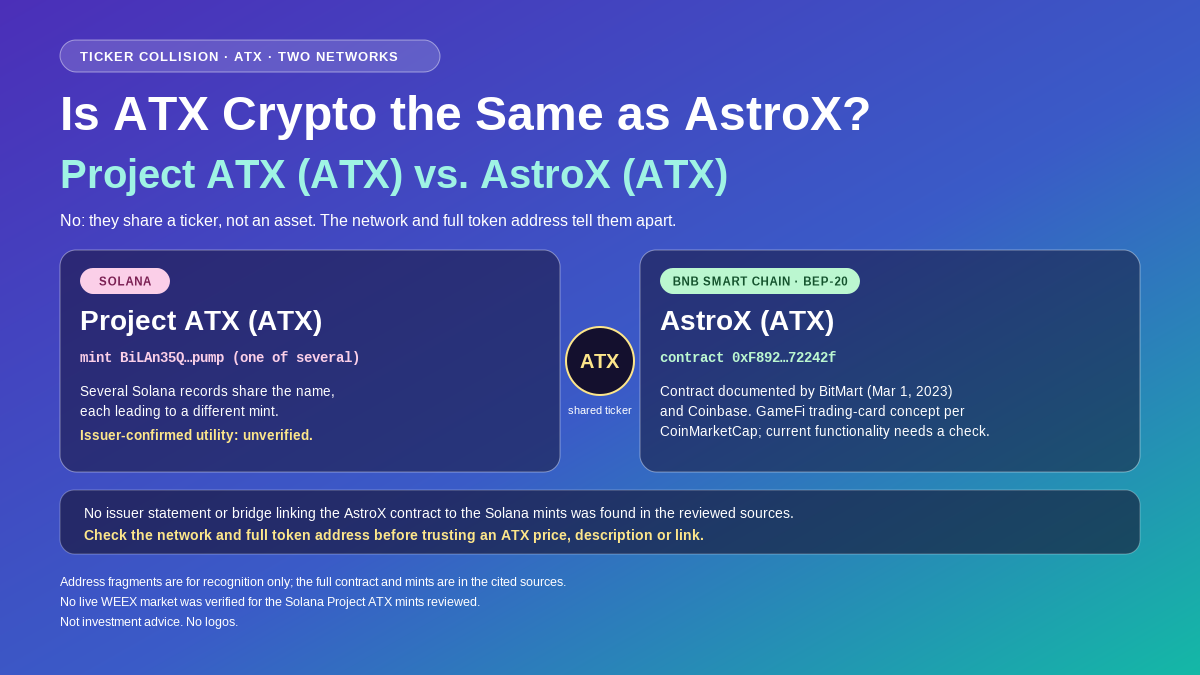
Is ATX Crypto the Same as AstroX? Project ATX (ATX) vs. AstroX (ATX)
Compare Project ATX on Solana with AstroX on BNB Smart Chain. Learn how to verify each token address before trusting an ATX price or buying guide.
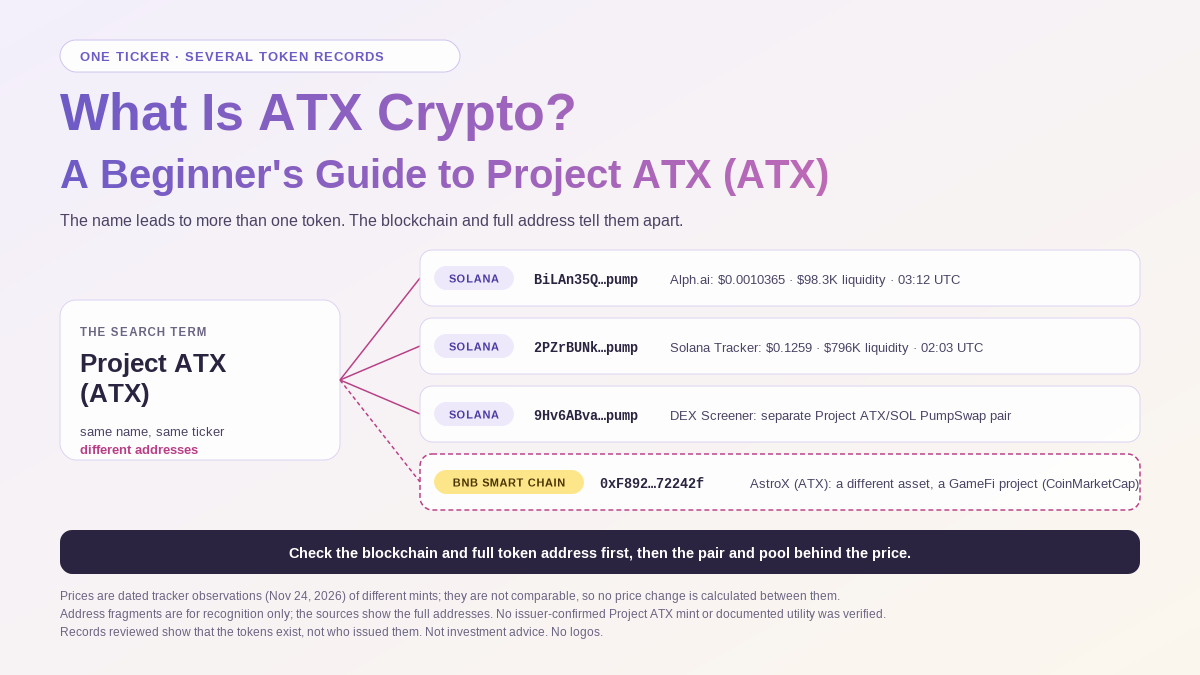
What Is ATX Crypto? A Beginner’s Guide to Project ATX (ATX)
Learn what ATX crypto means, why Project ATX appears under multiple Solana mint addresses, and how to tell those tokens apart from AstroX (ATX).
Amazon Supports Media AI Monetization with Article Access Fees in USDC
Samsung Wallet Starts Supporting Zero-Fee USDC Transfers via Sui Network
BitMine Increases Holdings by 7,819 ETH, Tom Lee States ETH's Annual Supply Growth Rate is Comparable to Bitcoin's
Trezor and Exodus Users Lose Over $600,000 on the Same iPhone

Polygon Labs launches Agglayer v1.0 with cross-chain settlement under 2 minutes
Solana Showcases AI Ecosystem Products and Development Tools

Cyber Prevents Cross-Chain Bridge Attack, Treasury Bears the Cost of Abnormal CYBER Issuance

KOSPI crash raises fears of further crypto market sell-off
Visa Crypto Labs launches new wallet that lets AI work and earn for you

Solana’s new memory checks could make some older app transactions fail
Solana upgrades to mainnet 1.0 as Foundation takes majority CoinGecko stake
IOSCO Warns of 'Quantum Delay' and Assesses Readiness for Quantum Threat

Cardano founder Hoskinson claims the network is functioning despite ADA price drop

PA Daily | US Spot Bitcoin ETF Has Seen Outflows of $3.47 Billion So Far in November; Abraxas Capital Buys $897 Million Worth of Bitcoin During Market Correction
Peter Schiff says Solana can replace Bitcoin exposure. Can it?
Cyber Faces Token Minting Issue on Solana
Solana 2027 Roadmap: Doubling Computing Power, Reducing Transaction Costs by 80%
Peter Schiff Points Out High Correlation in Mainstream Cryptocurrency Trends
Solana Heads Towards Its Worst Year in History
Follow the Money: Variational Raises $110 Million, Tether Activity and M&A Deals

Carl Moon Reveals Bitcoin Drops to $55,615

Anthropic's Largest IPO Ever Sees Stock Tokens Launch on Multiple Blockchains, Trading Volume Exceeds 1.5 Billion Yen

Hacker Transfers Approximately 488,000 ETH Worth About $860 Million
Securitize pays its first tokenized Apple stock dividend in USDC
唐华斑竹: PancakeSwap Renamed to Pancake, Users Exceed 208 Million
Can Solana become quantum-safe without losing its speed advantage?
Cyber Loses 5.213 Million CYBER in Theft, Equivalent Tokens Destroyed
Why Is the ATX Crypto Price Different Across Platforms? Project ATX (ATX) Explained
See why the ATX crypto price varies across platforms. Compare Project ATX mint addresses, PumpSwap pools, and swap quotes for the same trade size.
Is ATX Crypto the Same as AstroX? Project ATX (ATX) vs. AstroX (ATX)
Compare Project ATX on Solana with AstroX on BNB Smart Chain. Learn how to verify each token address before trusting an ATX price or buying guide.
What Is ATX Crypto? A Beginner’s Guide to Project ATX (ATX)
Learn what ATX crypto means, why Project ATX appears under multiple Solana mint addresses, and how to tell those tokens apart from AstroX (ATX).
Amazon Supports Media AI Monetization with Article Access Fees in USDC
Samsung Wallet Starts Supporting Zero-Fee USDC Transfers via Sui Network
Latest articles





Latest coin listings on WEEX


