
Historical B/S Indicators for Candlestick Charts

 Prefer us on Google


WEEX just got smarter! Review past trades and refine your strategies with our brand-new feature: Historical B/S (Buy/Sell) markers for candlestick charts! Now, you can view your past trades right on the chart, helping you make sharper decisions and trade more efficiently.
Highlights
- Trade records at a glance
- Your Buy (B) and Sell (S) points are automatically marked on the chart.
- Each marker shows your precise trade time and price, helping you review past orders at a glance.
- Comprehensive coverage
- Spot trading: Full support for marking trades across all spot pairs.
- Futures trading: Clearly shows open and close points, distinguishing between long and short positions.
- Rich interactions
- Tap any marker (B or S) to view detailed trade information, such as:
- Trade time: Review exact trade times and corresponding market conditions.
- Execution price: Displays the average filled price of historical trades.
- Trade count: Quickly check the number of trades in a certain period.
- Markers update dynamically as you zoom and drag the candlestick. Seamlessly review up to 100 executed trades from the last 90 days.
- Universal access
- Available on both iOS and Android: Access your trade history anytime, on any mobile device.
- Full currency coverage: Supports all pairs in your portfolio, across both spot and futures markets.
How to Use?
- Open the WEEX app and go to any pair's chart page.
- Tap the candlestick chart and enable the "Order history" feature in the chart settings (enabled by default.)
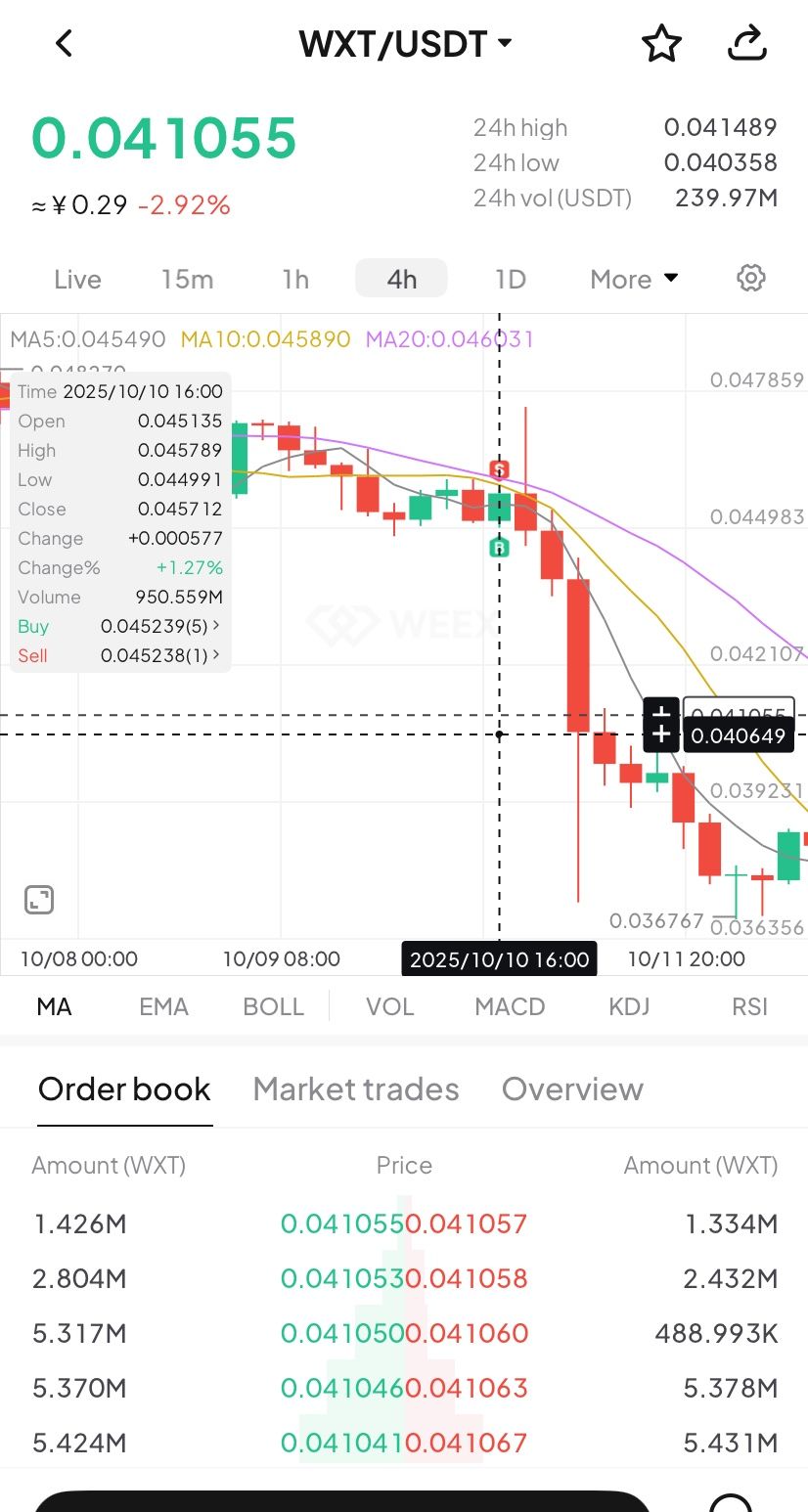
- If trades exist for that pair, B and S markers will instantly show up on the chart.
- Tap any marker to check the full details of that transaction.
Where to use it
- Review strategies: Quickly review your buy and sell points combined with market trends to refine your strategy.
- Analyze PnL: Easily pinpoint profitable or losing trades to learn from your past performance.
Understand trends: Combine your trade history with the candlestick chart data for deeper market and behavioral analysis.
-- Price
Feature preview
- On/off toggle: Use the "Settings" icon to switch the "Order History" feature on or off (enabled by default).
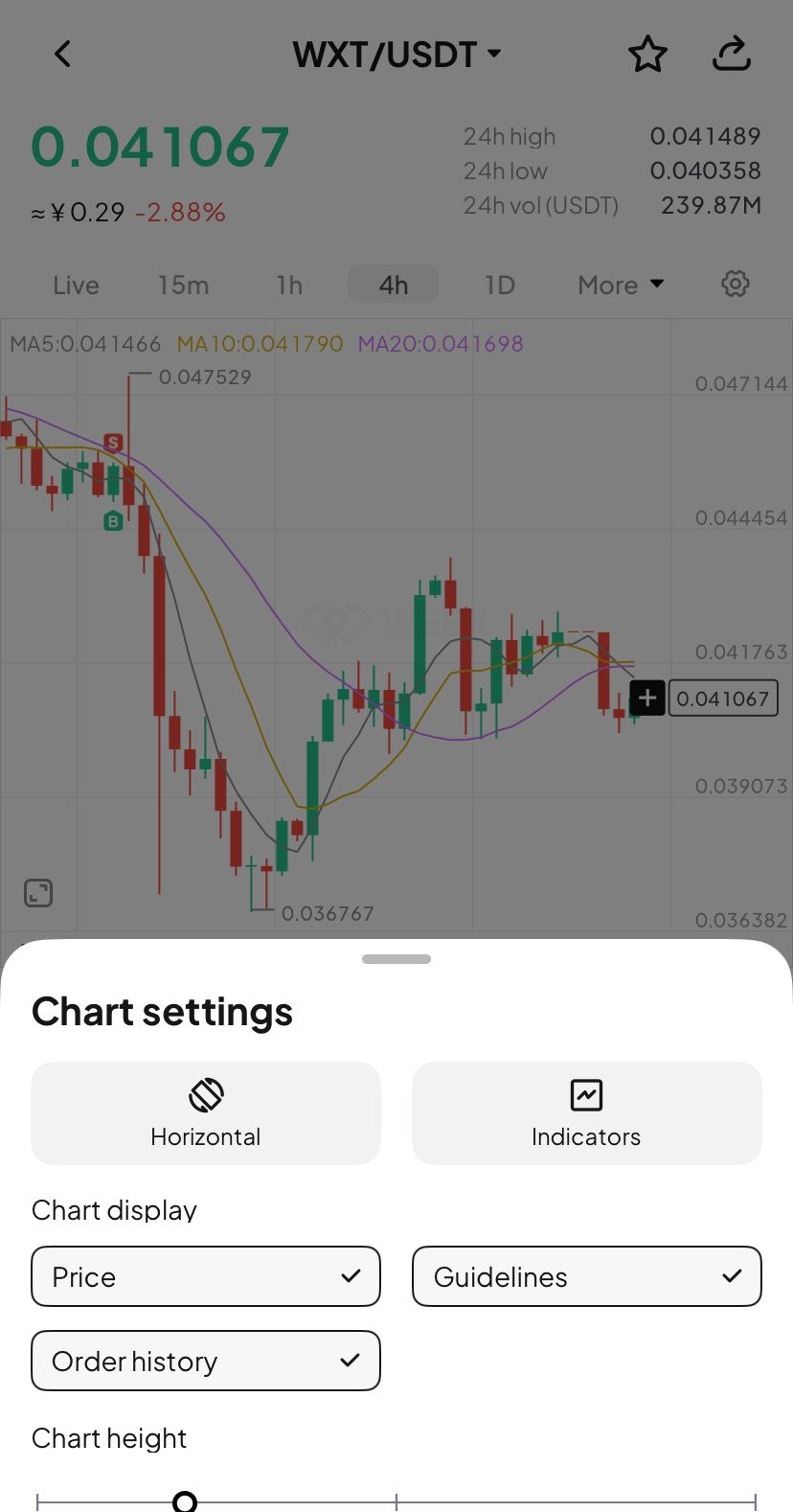
- B (Buy) marker: Green marker showing your exact buy action.
- S (Sell) marker: Red marker identifying every sell transaction.
- Details pop-up: Tapping the marker brings up a card with key data (time, price, and count).
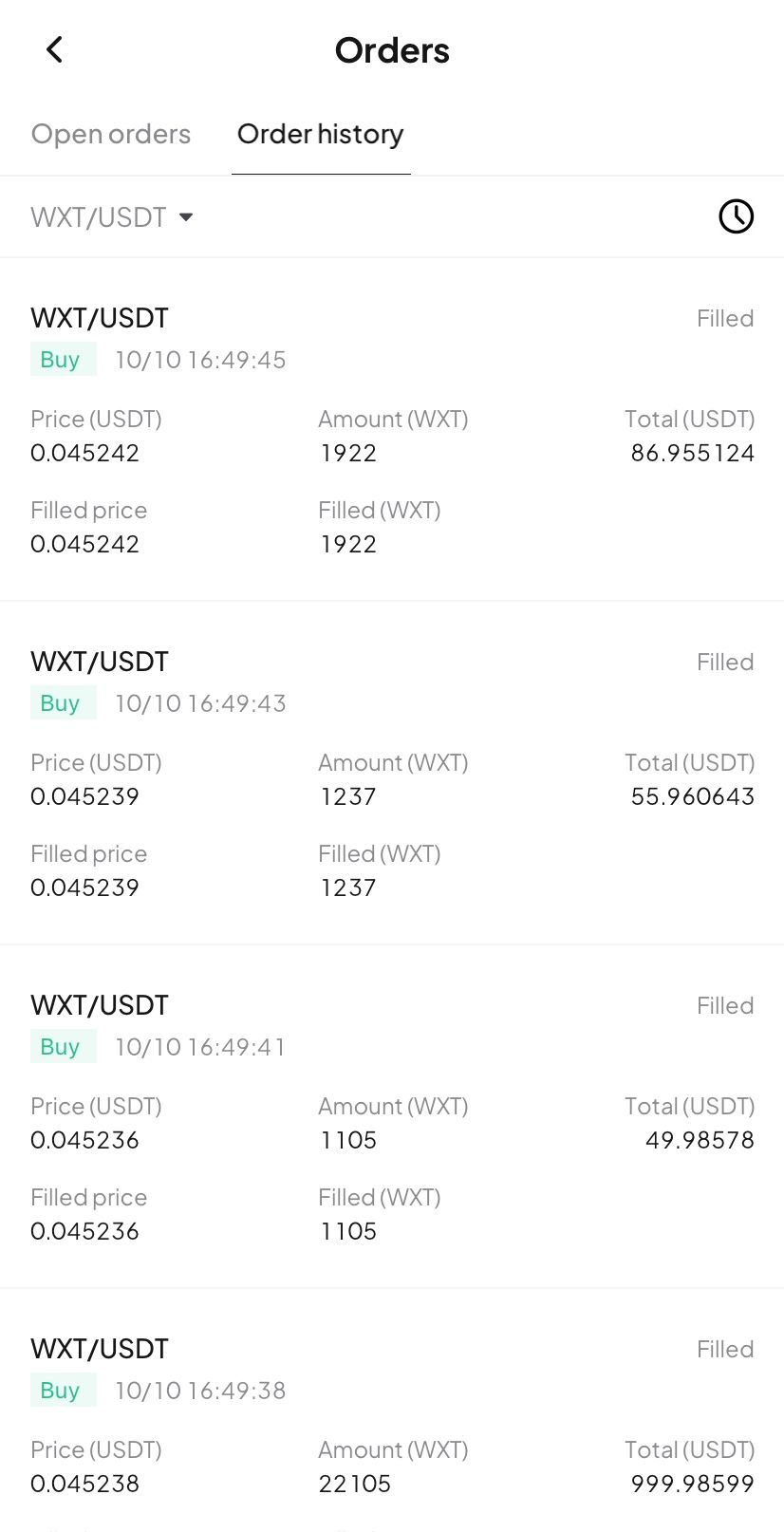
- Full breakdown: Tap the details card to open the "Order History" page and view your trading record.
Try now
Update your WEEX app to the latest version to experience our new Buy/Sell markers! Gain clarity and transparency in your trades, empowering smarter investment decision!
This content is provided for general informational purposes only and doesn't constitute financial, investment, legal, or tax advice. Any events, rewards, online promotions, or related information mentioned herein should not be considered a recommendation, solicitation, or invitation to purchase, sell, trade, or otherwise deal in any crypto assets. Crypto assets are highly volatile and may result in loss. The availability of WEEX services, products, and related events may vary by region. You are responsible for ensuring that your participation is in accordance with applicable local laws and regulations.
More launches

Spot Trends Before the Crowd? Try WEEX’s New Market Leaderboard with Hot, Gainers, Losers & More

WEEX P2P now supports DOP, PEN, CLP & BOB—Merchant Recruitment Now Open

WEEX Multi-Market Mode: See 6 Crypto Pairs at Once, Catch Every Breakout

WEEX Launches Multi-Chart Mode: 8 Charts, One Screen, Re-Defining Futures Trading

WEEX P2P now supports TZS & UGX—Merchant Recruitment Now Open

Moving Assets Should Be Effortless: WEEX Rebuilds the Withdrawal Experience From the Ground Up
WEEX API Fast Connect: Turn Every Sign-In Into a Live Trader in Under 10 Seconds
WEEX API Fast Connect is a one-click OAuth authorization system that lets your users link their WEEX account without ever touching an API key. Frictionless onboarding, faster conversions, higher retention — built for WEEX Broker partners.

Trade Spot Market Orders With More Control: WEEX Adds Slippage Tolerance

WEEX P2P now supports BDT & LKR—Merchant Recruitment Now Open

WEEX API Broker Program: Turn Your Trading Platform Into a Revenue Engine

WEEX Launches Depth Chart for Spot Trading

WEEX OpenAPI 101: 5 Powerful Modules, AI Trading Tools, and Grab Up to 70% Revenue Opportunities
Learn how WEEX OpenAPI connects traders, developers, AI agents, and trading platforms. Discover WEEX API features, Binance-compatible integration, automated trading workflows, revenue opportunities, and ecosystem possibilities.

WEEX Live mode: Monitor 20 trading pairs at once and trade like a pro

WEEX Makes Affiliate Access Easier on the Web and in the App
Customize Your Spot Trading Page: Drag Modules and Move the Order Panel Where You Want It

WEEX App Just Got Smarter – New Tabs for Faster Trades & Easy Asset Management

WEEX All-New Search Features: Find, Trade & Earn Faster Than Ever

Meet the new WEEX trial fund—your gateway to greater profits