


WEEX Asset Balance: How to Check Your Assets and Understand What Each Account Shows
A WEEX asset overview is not a single number. WEEX uses a segregated account structure, so your balance is split across a Funding account and separate trading accounts, and checking "your assets" really means checking several of them. This guide walks through what each account holds, where to find your balance on the website and through the API, and what to do if a number does not match what you expect.
Why WEEX Splits Your Balance Across Accounts
According to WEEX's own trading guide, deposits land in a main Funding Account, and from there you transfer funds into dedicated sub-accounts for the product you actually want to use: a Spot Account for buying and selling cryptocurrencies directly, a Futures Account for leveraged derivatives trading, and an Earn Account for staking or savings products.
That structure exists to keep exposure separate. A balance sitting in Earn is not automatically available as futures margin, and a balance in your Spot account does not count toward funding fees on an open futures position. If a number looks wrong at first glance, the first thing to check is not the total, it's which account the funds are actually sitting in.
Checking Your Overall Asset Balance on WEEX
On the WEEX website, your asset overview is reached through Assets, where deposit, withdrawal, and account balances are managed.
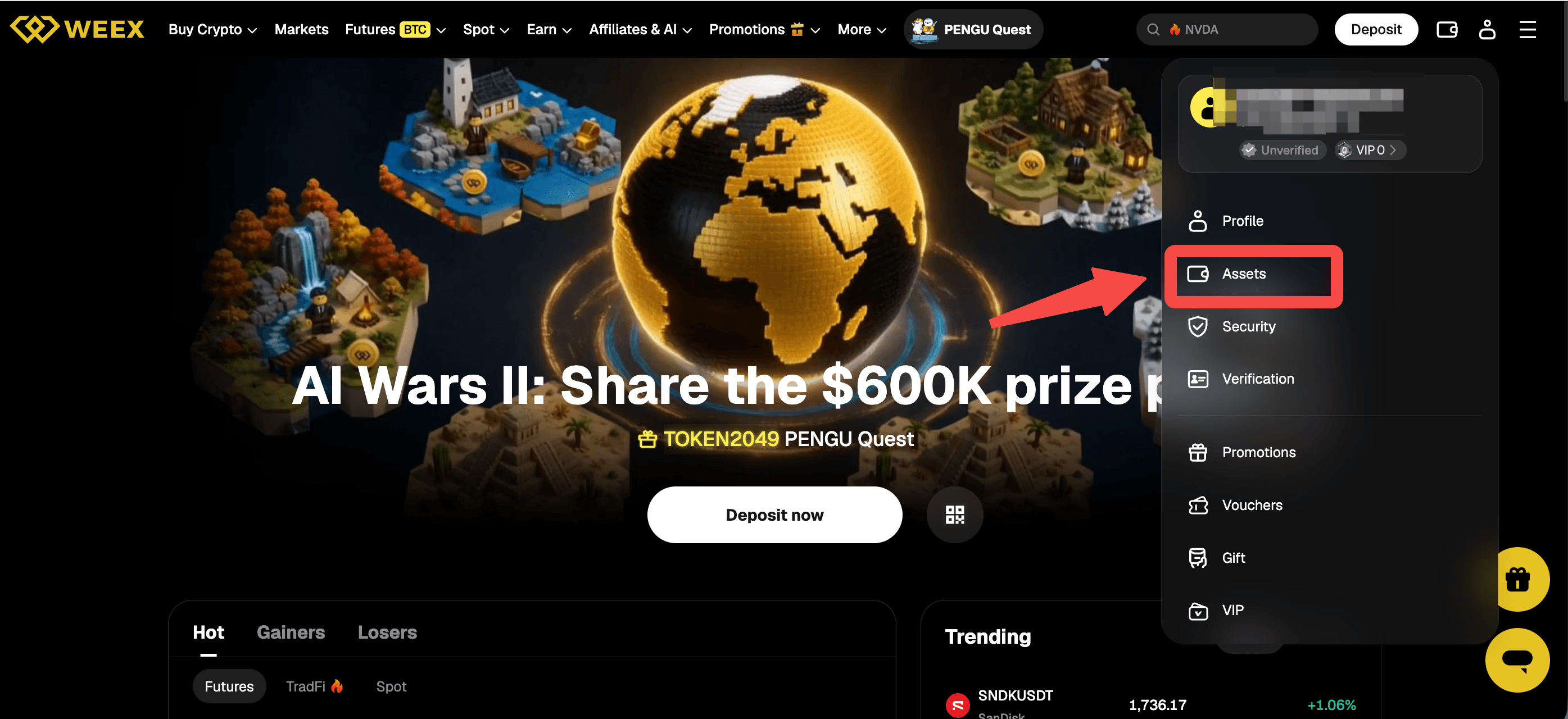
From there you can see your Funding balance and move into the Spot, Futures, or Earn sections to see what is currently allocated to each. The WEEX app follows the same structure, with an Assets section in the account menu.
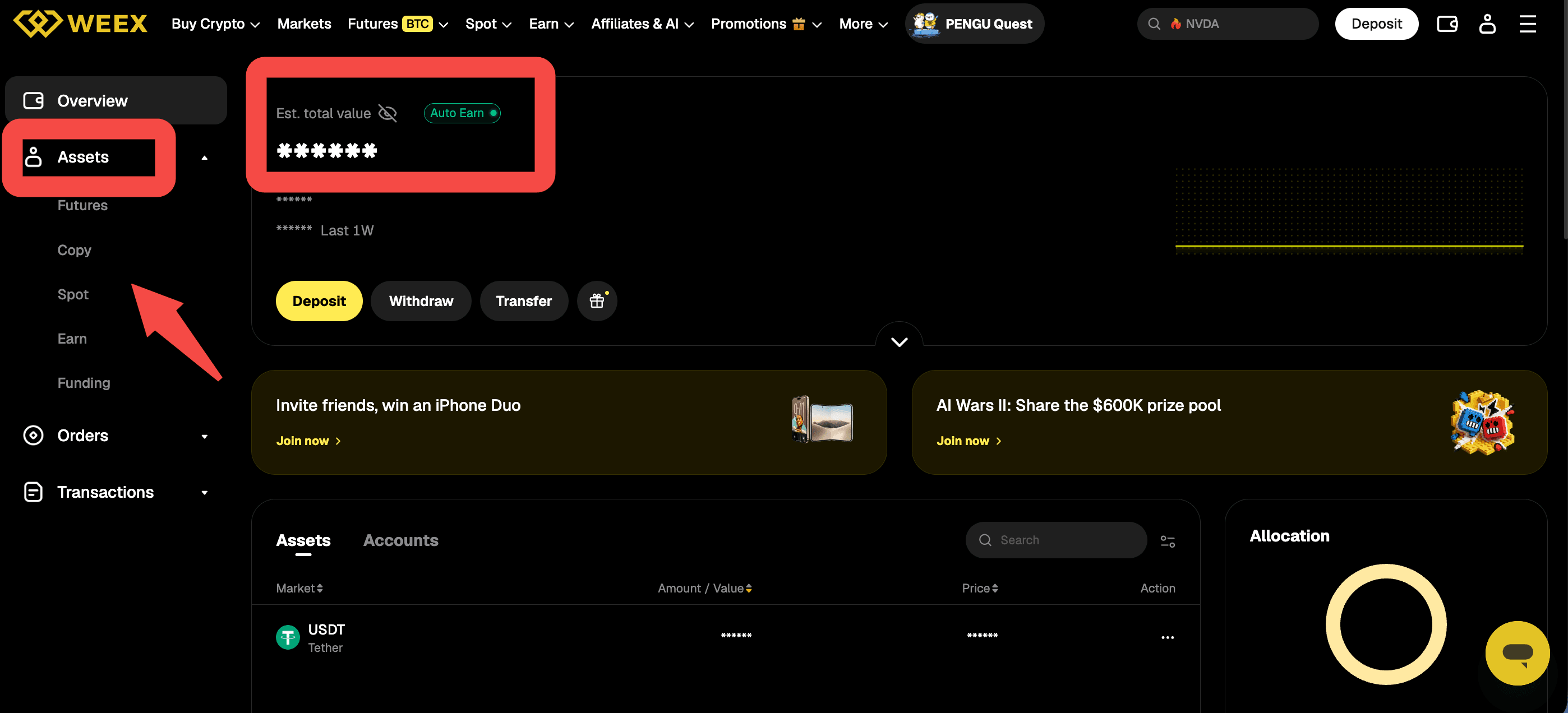
Beyond the top level view, each section on the Assets page breaks the number down further. Your Spot balance lists each asset you hold, along with how much of it is actually free to trade or withdraw versus how much is locked, most commonly because it's backing an open order. Your Futures balance follows a similar pattern for contract accounts, showing each asset's total balance, its available balance, the amount currently frozen as margin, and its unrealized profit and loss on any open position.
Why Your Deposit Might Not Show Up Yet
A deposit that does not immediately appear in your balance is one of the most common asset-checking questions, and it usually comes down to timing or a network mismatch rather than a lost transfer. According to WEEX's deposit guide, crypto deposits typically require several network confirmations before being credited, and you can check exactly where a specific deposit stands in the Deposit History section of the deposit page rather than guessing from the overall balance alone.
Network mismatches are the more serious version of this problem. Sending funds on a different blockchain network than the one WEEX generated the deposit address for means the transfer will not arrive automatically, according to WEEX's own deposit documentation, which is why confirming the network before sending, not just the address, matters every time you fund your account.
Reading Your Balance Alongside an Open Futures Position
If you're holding a leveraged position, your asset balance and your position's health are connected but not identical, and conflating them is a common mistake. The balance figures cover what you actually hold; a position's liquidation risk depends on that balance relative to the margin the position requires, which changes as the market moves even if you haven't touched your account.
WEEX's own trading guide flags one specific, recurring cost worth checking against your balance directly: every eight hours, a funding fee is exchanged between long and short positions, and the guide specifically advises checking the funding rate before holding a position overnight. In typical market conditions that rate is small, commonly 0.01% or less according to the guide, but it is a real, recurring adjustment to your balance that a one-time asset check will not show you unless you look at it specifically.
What a Verifiable Protection Fund Adds to an Asset Check
Checking your own balance is one part of trusting what an exchange shows you. The other is being able to verify the platform's own solvency independent of what any single balance page displays. WEEX backs trading with a publicly disclosed 1,000 BTC protection fund at weex.com/protectfund, a page WEEX has described as providing a real-time, publicly verifiable on-chain address, meaning the fund's balance can be checked on-chain rather than taken on trust.
That verifiability matters specifically because it doesn't depend on WEEX's own account interface working correctly at any given moment. If you're ever unsure whether an asset figure on your account reflects the platform's actual reserves, the protection fund page is a separate, independently checkable reference point rather than another number generated by the same system you're trying to verify.
Conclusion
A WEEX asset overview is really several balances at once: Funding, Spot, Futures, and Earn, each visible through the Assets section on the website or app, or through the corresponding spot and futures balance endpoints if you use the API. Free and locked balances describe what's actually available right now, deposits can take time to confirm and depend on matching the correct network, and funding fees on open futures positions are a real, recurring adjustment worth checking specifically rather than assuming your total balance tells the whole story. For a check that doesn't depend on the platform's own interface, WEEX's publicly disclosed 1,000 BTC protection fund offers a separately verifiable reference point.
FAQ
1. Where do I check my asset balance on WEEX?
Go to the Assets section on the WEEX website or app, where you can see your Funding balance and move into Spot, Futures, or Earn to see what's allocated to each.
2. Why is my available balance lower than my total balance?
Part of your balance may be locked, backing an open order or an open futures position, or, on the futures side, frozen as margin with an unrealized profit or loss that hasn't been settled yet.
3. Why hasn't my deposit shown up in my balance yet?
Crypto deposits typically need several network confirmations before being credited, and you can track a specific deposit's status in the Deposit History section of the deposit page.
4. What happens if I send a deposit on the wrong network?
According to WEEX's deposit documentation, funds sent on a different blockchain network than the one used to generate your deposit address will not arrive automatically, so confirming the network before sending matters as much as the address itself.
5. How can I verify WEEX's reserves independently of my own account balance?
WEEX publishes a publicly disclosed 1,000 BTC protection fund at weex.com/protectfund, with an on-chain address that can be checked independently rather than relying solely on the platform's own balance display.

Gainers


