
Popular topics

Popular topics

WEEX P2P ads sorting now available
By: WEEX
|
0
WEEX P2P now supports ad sorting, making it easier to compare offers and find one that fits your trading needs.
You can sort P2P ads at the best price, most orders, or completion rate. This feature is available for both buy and sell P2P orders.
How to sort P2P ads
Step 1: Open P2P
- Open the WEEX App and go to P2P.
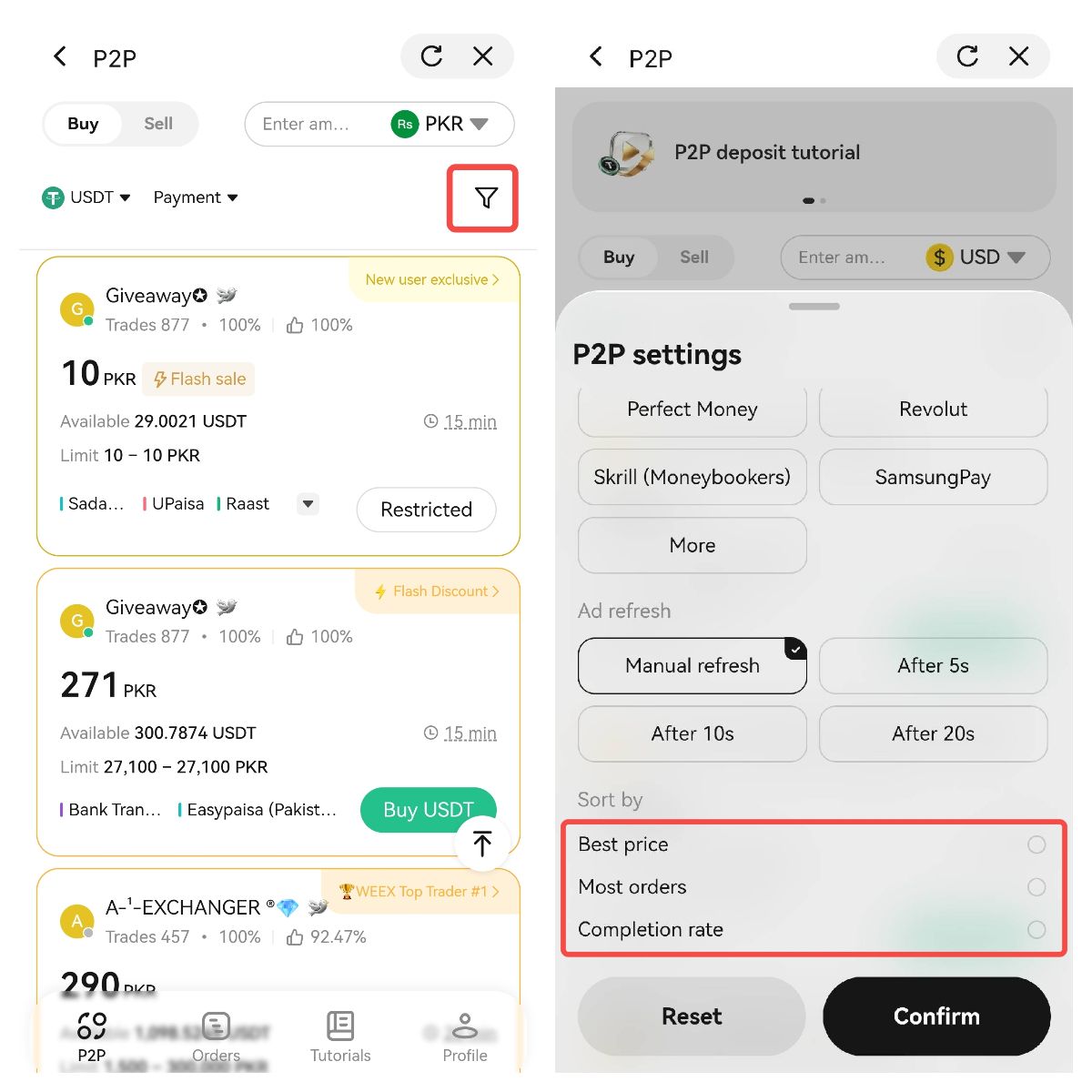
- Tap the Settings icon on the P2P trading page.
- Scroll down and select Sort by.
Step 2: Choose a sorting method
Choose one of the following options:
- Best price View offers with the most competitive prices first.
- Most orders Prioritize advertisers with more completed orders.
- Completion rate Prioritize advertisers with higher completion rates.
Step 3: Confirm your selection
Choose your preferred sorting method and select Confirm. The P2P ad list will then be sorted based on your selection.
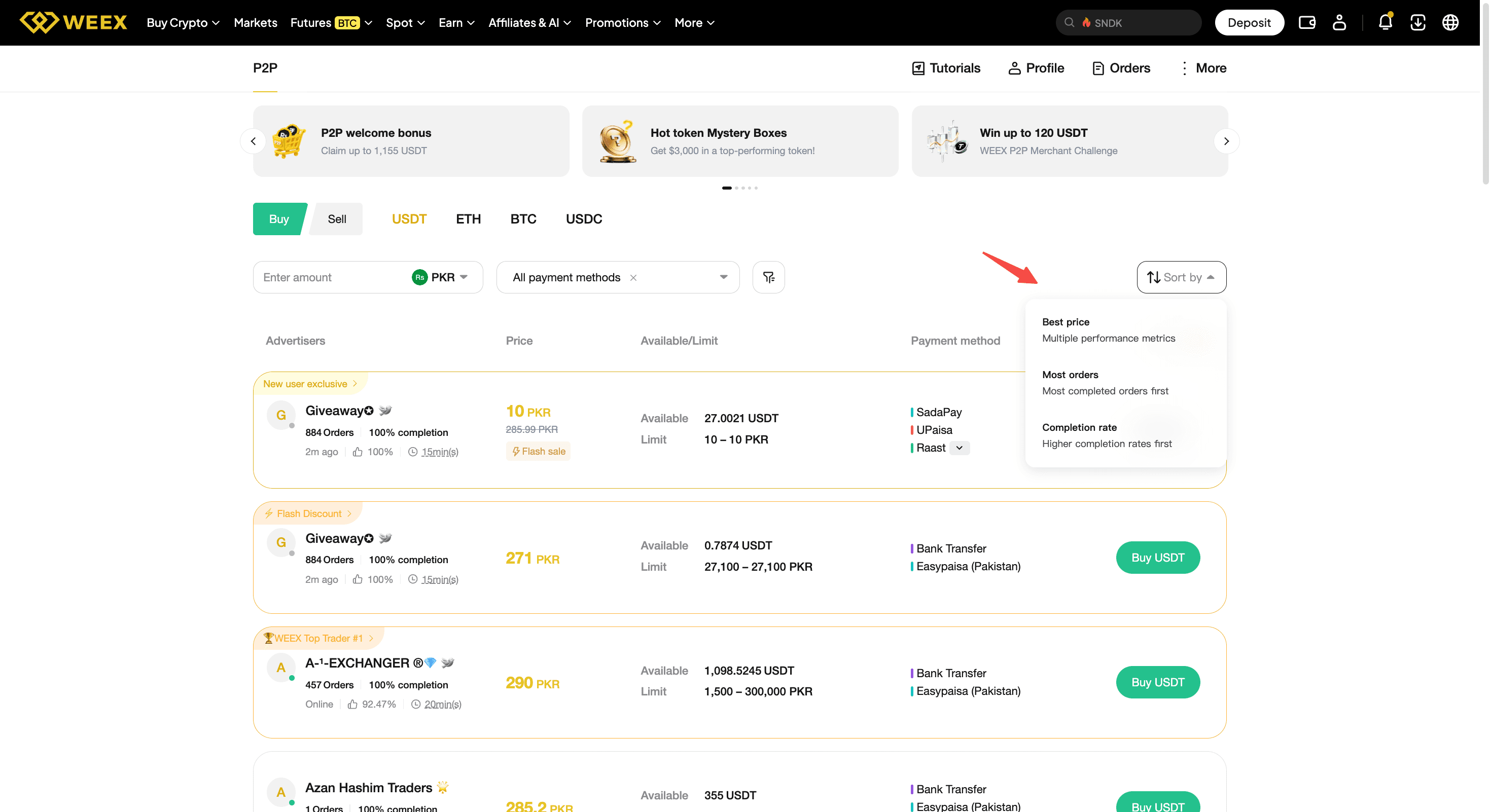
On the website and mobile web, you can find Sort by on the P2P ad list.
Select Sort by, choose your preferred sorting method, and the available ads will be displayed accordingly.
Which sorting option should I use?
| Your goal | Recommended sorting |
| Find competitive offers | Best price |
| Find advertisers with more completed orders | Most orders |
| Prioritize higher completion rates | Completion rate |
Sorting only changes the display order of available ads. Before placing an order, always review the price, available amount, order limits, payment method, and advertiser information.
FAQ
Q1. Where is P2P ad sorting available?
P2P ad sorting is available on the WEEX app, website, and mobile web.
Q2. What sorting options are available?
WEEX P2P currently supports the following sorting options: - Best price - Most orders - Completion rate
Additional sorting options may be introduced in the future.
Q3. Does sorting change an ad's price?
No. Sorting only changes the display order of available ads. It does not change an advertiser's price, order limits, payment methods, or other ad settings.
Q4. Does the first ad always mean it's the best choice?
No. Sorting helps you compare ads based on your selected criteria. You should still check the price, limits, payment method, completion rate, and advertiser information before placing an order.
Q5. Can I use sorting with other P2P settings?
Yes. In P2P settings, you can configure available payment methods, ad refresh frequency, and sorting preferences.
Q6. How are ads sorted when values are the same?
If multiple ads have the same price, order count, or completion rate, WEEX may use other factors to determine their display order. Rankings can vary depending on the selected sorting method and other relevant factors. The display order does not guarantee that an advertiser will always appear in the same position.
Related articles
Share
Gainers


Customer Support:@weikecs
Business Cooperation:@weikecs
Quant Trading & MM:bd@weex.com
VIP Program:support@weex.com
